Chapter 10
Java Collections Framework
6 topics · 1 sections · beginner-friendly study notes · Updated
The Collections Framework is a set of interfaces and classes in java.
util that store and process groups of objects.
This chapter covers the framework hierarchy, ArrayList, LinkedList, HashSet, TreeSet, HashMap and how to sort objects with Comparable and Comparator.
Arrays are fixed in size.
Real programs need growable lists, unique sets and fast key-value lookup, and every Java interview has collection questions.
Shopping carts (List), unique visitors (Set), caching and word counts (Map), task queues (Queue), leaderboards (sorted lists).
Collections Framework in Java
The Java Collections Framework (JCF) is a unified architecture in java.util consisting of interfaces (Collection, List, Set, Queue, Deque, Map), their implementations (ArrayList, LinkedList, HashSet, TreeSet, PriorityQueue, HashMap ...) and algorithms (the Collections utility class).
In short: It is a ready-made set of containers: lists to keep order, sets to avoid duplicates, maps to look up values by key.
Think about it
Reusing tested data structures saves time, improves performance and gives a common API across implementations. A kitchen: lists are spice racks in order, sets are a bowl of unique fruits, maps are the labelled jars.
Iterable is the root interface (it enables for-each); Collection extends Iterable and is the parent of List (ordered, duplicates allowed), Set (no duplicates) and Queue (FIFO / priority).
Map is NOT a subtype of Collection; it stores key-value pairs with unique keys.
Main implementations: List → ArrayList, LinkedList, Vector, Stack; Set → HashSet, LinkedHashSet, TreeSet; Queue/Deque → ArrayDeque, PriorityQueue, LinkedList; Map → HashMap, LinkedHashMap, TreeMap, Hashtable, ConcurrentHashMap.
Collection (interface) is different from Collections (utility class with sort, reverse, shuffle, max, min, unmodifiableList, synchronizedList).
Generics give compile-time type safety.
Iterators (iterator(), hasNext(), next(), remove()) traverse collections; modifying a collection during a for-each loop throws ConcurrentModificationException (fail-fast).
Immutable factories `List.
of, Set.
of, Map.
of` (Java 9) return unmodifiable collections.
Collections hold only objects, so primitives are auto-boxed (int → Integer).
Key points
- Collection: Root interface for groups of elements (List, Set, Queue).
- Collections: Utility class with static helpers for collections.
- Iterator: Object that walks through a collection one element at a time.
- Fail-fast: Iterator throws ConcurrentModificationException if the collection changes during iteration.
- Generics: Type parameters like List<String> checked at compile time.
- Map does not extend Collection.
- List: ordered + duplicates. Set: unique. Queue: FIFO. Map: key
→value. - Collection is an interface; Collections is a class of static methods.
- Use interface types on the left: List<String> list = new ArrayList<>();
Example
CodeHierarchy in practice: List, Set, Map, Queue, Collections:
import java.util.*;
public class FrameworkDemo {
public static void main(String[] args) {
List<String> list = new ArrayList<>(List.of("b", "a", "b"));
Set<String> set = new HashSet<>(list);
Map<String, Integer> map = new HashMap<>();
Queue<Integer> queue = new LinkedList<>();
System.out.println(list); // [b, a, b] duplicates allowed
System.out.println(set.size()); // 2 duplicates removed
map.put("one", 1);
System.out.println(map); // {one=1}
queue.offer(1); queue.offer(2);
System.out.println(queue.poll()); // 1 (FIFO)
Collections.sort(list);
System.out.println(list); // [a, b, b]
Collections.reverse(list);
System.out.println(list); // [b, b, a]
System.out.println(Collections.max(list) + " " + Collections.frequency(list, "b")); // b 2
List<Integer> nums = new ArrayList<>(List.of(1, 2, 3, 4));
Iterator<Integer> it = nums.iterator();
while (it.hasNext()) {
if (it.next() % 2 == 0) it.remove(); // safe removal
}
System.out.println(nums); // [1, 3]
try {
for (Integer n : nums) nums.add(9); // modifying while iterating
} catch (ConcurrentModificationException e) {
System.out.println("Fail-fast: ConcurrentModificationException");
}
List<String> fixed = List.of("x", "y");
try { fixed.add("z"); }
catch (UnsupportedOperationException e) { System.out.println("Immutable list"); }
}
}ArrayList in Java
ArrayList is a resizable-array implementation of the List interface. It keeps insertion order, allows duplicates and null, and gives fast index-based access.
In short: An ArrayList is an array that grows by itself when it becomes full.
Think about it
It is the default list in Java: best when you read by index a lot and mostly add at the end. A student roll-call list that keeps growing as new students join.
Internally it holds an Object[] buffer.
The default capacity is 10 (allocated on the first add); when full it grows by about 50% (new = old + old/2) by copying the array.
get(i) and set(i, x) are O(1); add(x) at the end is amortized O(1); add(i, x) and remove(i) shift elements, so O(n); contains and indexOf are O(n).
It is not synchronized (use `Collections.
synchronizedList` or CopyOnWriteArrayList).
Pitfall: for List<Integer>, remove(1) removes the element at INDEX 1 while `remove(Integer.
valueOf(1))` removes the VALUE 1.
subList(from, to) is a view, not a copy.
Use new ArrayList<>(n) if you know the size to avoid resizing, trimToSize() to release spare capacity, `removeIf(predicate) to filter and toArray` to convert.
Compared with Vector, ArrayList is not synchronized and grows 1.5× instead of doubling.
Key points
- Capacity: Size of the internal array (
size()is the number of elements). - Amortized
O(1): Occasional resize cost averaged over many adds. - Random access: Direct access to any index in
O(1). - Autoboxing: Automatic int ↔ Integer conversion.
- Default capacity 10, growth 1.5×.
- Allows duplicates, nulls and keeps insertion order.
- Not thread-safe.
remove(int index)vs remove(Object o) is a classic trap for Integer lists.
Example
CodeArrayList operations and the remove() trap:
import java.util.*;
public class ArrayListDemo {
public static void main(String[] args) {
List<Integer> nums = new ArrayList<>(List.of(10, 20, 30, 40));
nums.add(50); // [10, 20, 30, 40, 50]
nums.add(1, 15); // [10, 15, 20, 30, 40, 50]
nums.set(0, 5); // [5, 15, 20, 30, 40, 50]
System.out.println(nums.get(2)); // 20
System.out.println(nums.contains(30) + " " + nums.indexOf(40)); // true 4
nums.remove(1); // removes INDEX 1 (value 15)
System.out.println(nums); // [5, 20, 30, 40, 50]
nums.remove(Integer.valueOf(40)); // removes VALUE 40
System.out.println(nums); // [5, 20, 30, 50]
nums.removeIf(n -> n > 25);
System.out.println(nums); // [5, 20]
List<String> names = new ArrayList<>();
names.add("Neha"); names.add("Amit"); names.add("Ravi"); names.add("Amit");
Collections.sort(names);
System.out.println(names); // [Amit, Amit, Neha, Ravi]
System.out.println(names.subList(1, 3)); // [Amit, Neha]
for (String n : names) System.out.print(n.charAt(0)); // AANR
System.out.println();
String[] arr = names.toArray(new String[0]);
System.out.println(arr.length); // 4
System.out.println(names.size() + " " + names.isEmpty()); // 4 false
}
}LinkedList in Java
LinkedList is a doubly-linked-list implementation of both List and Deque. Each element is stored in a node that holds references to the previous and next nodes.
In short: A LinkedList is a chain of nodes: to reach the 5th item you walk from one end, but adding or removing at the ends is instant.
Think about it
It shows the trade-off between array-based and node-based structures, a favourite interview comparison. A train: you can attach or remove a coach at either end easily, but finding the 7th coach means walking along the train.
Operations at the head or tail (addFirst, addLast, removeFirst, removeLast, getFirst) are O(1).
Access by index get(i) is O(n) because it must traverse (from the nearer end).
Insert/remove in the middle is O(1) once you hold the node (for example through an Iterator or ListIterator), but finding it is O(n).
It uses more memory than ArrayList (two references per node plus an object header).
Because it implements Deque it can act as a queue (offer, poll, peek) or a stack (push, pop).
Allows duplicates and nulls and is not synchronized.
In practice ArrayList is faster for most workloads because of CPU cache locality; choose LinkedList only for heavy head/tail insertion or as a queue (ArrayDeque is usually even better as a stack/queue).
Key points
- Node: Element holder with prev, next and item.
- Deque: Double-ended queue: insert/remove at both ends.
- ListIterator: Iterator that moves both directions and can add/remove.
Example
CodeLinkedList as list, queue and stack:
import java.util.*;
public class LinkedListDemo {
public static void main(String[] args) {
LinkedList<String> ll = new LinkedList<>();
ll.add("B");
ll.addFirst("A");
ll.addLast("C");
System.out.println(ll); // [A, B, C]
System.out.println(ll.getFirst() + " " + ll.getLast()); // A C
System.out.println(ll.removeFirst()); // A
ll.push("Z"); // stack push at head
System.out.println(ll); // [Z, B, C]
System.out.println(ll.pop()); // Z
System.out.println(ll.poll()); // B (queue style)
System.out.println(ll.peek()); // C
System.out.println(ll); // [C]
LinkedList<Integer> nums = new LinkedList<>(List.of(1, 2, 4, 5));
ListIterator<Integer> it = nums.listIterator();
while (it.hasNext()) {
if (it.next() == 2) it.add(3); // insert while iterating
}
System.out.println(nums); // [1, 2, 3, 4, 5]
Queue<String> q = new LinkedList<>();
q.offer("t1"); q.offer("t2"); q.offer("t3");
while (!q.isEmpty()) System.out.print(q.poll() + " "); // t1 t2 t3
System.out.println();
}
}ArrayList vs LinkedList
ArrayList: fast get(i), slow middle insert.
LinkedList: fast head/tail insert, slow get(i), more memory.
As queue
offer() adds at tail, poll() removes the head, peek() looks at the head.
As stack
push() adds at the head, pop() removes from the head.
HashSet and TreeSet
Set is a collection with no duplicate elements. HashSet stores elements in a hash table (no order, O(1) average), LinkedHashSet keeps insertion order, and TreeSet stores elements in a sorted red-black tree (O(log n)).
In short: A Set is a bag that refuses duplicates. HashSet does not care about order, TreeSet keeps everything sorted.
Think about it
Removing duplicates, fast contains() checks and set algebra (union, intersection) are common requirements. A guest list that rejects repeated names (HashSet) or an alphabetical register (TreeSet).
HashSet is backed by a HashMap: elements are the keys.
add(x) returns true if x was new, false if an equal element already exists; equality is decided by hashCode() then equals(), so custom classes stored in a HashSet MUST override both consistently (records do this automatically).
It permits one null.
Iteration order of HashSet is unspecified.
LinkedHashSet adds a linked list to remember insertion order.
TreeSet implements NavigableSet/SortedSet: elements are kept sorted by natural ordering (Comparable) or by a Comparator passed to the constructor; it uses compareTo/compare (not equals) to detect duplicates, does not allow null (NullPointerException) and offers first(), last(), floor(), ceiling(), higher(), lower(), headSet(), tailSet(), subSet(), descendingSet().
Use HashSet for fastest membership tests, LinkedHashSet for predictable order and TreeSet when you need sorted or range queries.
Key points
- hashCode: Integer used to choose the bucket.
- equals: Final test that two elements are the same.
- Red-black tree: Self-balancing binary search tree used by TreeSet/TreeMap.
- NavigableSet: Sorted set with floor, ceiling, higher and lower methods.
- HashSet: unordered,
O(1), onenull. LinkedHashSet: insertion order. TreeSet: sorted,O(log n), nonull. - Duplicates are detected by equals/hashCode (HashSet) or compareTo (TreeSet).
- Override equals and hashCode together.
- Set operations: addAll (union), retainAll (intersection), removeAll (difference).
Read more
Example
CodeHashSet, LinkedHashSet and TreeSet:
import java.util.*;
public class SetDemo {
record Point(int x, int y) { } // record: equals/hashCode generated (Java 16)
public static void main(String[] args) {
Set<String> hs = new HashSet<>();
System.out.println(hs.add("java")); // true
System.out.println(hs.add("java")); // false (duplicate)
System.out.println(hs.size()); // 1
Set<String> ordered = new LinkedHashSet<>(List.of("c", "a", "b", "a"));
System.out.println(ordered); // [c, a, b] insertion order
TreeSet<Integer> ts = new TreeSet<>(Arrays.asList(50, 10, 40, 20, 30, 20));
System.out.println(ts); // [10, 20, 30, 40, 50]
System.out.println(ts.first() + " " + ts.last()); // 10 50
System.out.println(ts.floor(35) + " " + ts.ceiling(35)); // 30 40
System.out.println(ts.higher(40) + " " + ts.lower(10)); // 50 null
System.out.println(ts.headSet(30)); // [10, 20]
System.out.println(ts.tailSet(30)); // [30, 40, 50]
System.out.println(ts.descendingSet());// [50, 40, 30, 20, 10]
TreeSet<String> byLength = new TreeSet<>(Comparator.comparing(String::length));
byLength.addAll(List.of("kiwi", "fig", "pear", "plum"));
System.out.println(byLength); // [fig, kiwi] (pear, plum equal length -> duplicates)
Set<Point> pts = new HashSet<>();
pts.add(new Point(1, 2));
pts.add(new Point(1, 2));
System.out.println(pts.size()); // 1
Set<Integer> a = new TreeSet<>(List.of(1, 2, 3, 4));
Set<Integer> b = new TreeSet<>(List.of(3, 4, 5));
Set<Integer> union = new TreeSet<>(a); union.addAll(b);
Set<Integer> inter = new TreeSet<>(a); inter.retainAll(b);
System.out.println(union + " " + inter); // [1, 2, 3, 4, 5] [3, 4]
try { new TreeSet<String>().add(null); }
catch (NullPointerException e) { System.out.println("TreeSet rejects null"); }
}
}HashMap in Java
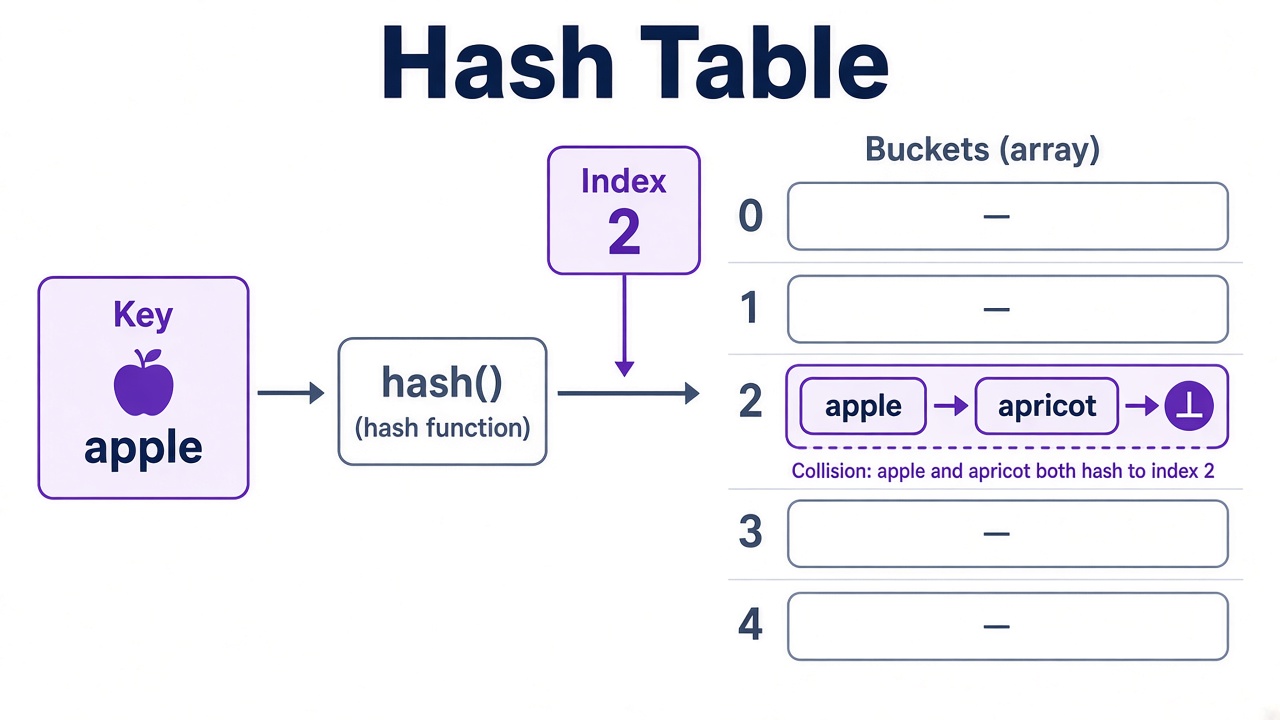
HashMap is a hash-table implementation of the Map interface that stores key-value pairs. Keys are unique, one null key and many null values are allowed, and the iteration order is not guaranteed. get/put are O(1) on average.
In short: A HashMap is a dictionary: give it a key and it instantly returns the value stored for that key.
Think about it
Fast lookup by key is needed for caches, counting, indexing and grouping; HashMap internals are asked in almost every interview. A phone book: look up a name (key) to get the number (value) without scanning every page.
HashMap keeps an array of buckets (default capacity 16, load factor 0.75).
put(key, value) computes hash(key) (hashCode with extra bit spreading), finds the bucket index (n - 1) & hash, and if the bucket is occupied compares keys with equals(); an equal key gets its value replaced (the old value is returned), otherwise a node is appended.
Collisions are handled by a linked list per bucket, converted to a red-black tree when a bucket has 8+ entries and the table is at least 64 (Java 8), keeping worst-case lookup O(log n).
When size exceeds capacity × 0.75 the table doubles (rehash).
Keys should be immutable and must override hashCode/equals consistently, otherwise lookups fail.
Useful methods: put, get, getOrDefault, containsKey, containsValue, remove, putIfAbsent, merge, compute, computeIfAbsent, keySet, values, entrySet.
HashMap is not synchronized (use ConcurrentHashMap); Hashtable is old and synchronized and rejects nulls.
LinkedHashMap keeps insertion order and TreeMap keeps keys sorted.
Key points
- Bucket: Slot in the internal array that holds entries with the same index.
- Load factor: Fill ratio (0.75) at which the table is resized.
- Collision: Two keys landing in the same bucket.
- Entry: A key-value pair (Map.Entry).
- Rehashing: Rebuilding the table after doubling capacity.
- Default capacity 16, load factor 0.75, resize doubles.
put()on an existing key replaces the value and returns the old one.- One
nullkey allowed; Hashtable and ConcurrentHashMap allow none. - Treeification happens at 8 nodes in a bucket (table size
>=64).
Example
CodeHashMap methods, counting and grouping:
import java.util.*;
public class HashMapDemo {
public static void main(String[] args) {
Map<String, Integer> marks = new HashMap<>();
marks.put("Amit", 90);
marks.put("Neha", 85);
System.out.println(marks.put("Amit", 95)); // 90 (old value returned)
System.out.println(marks.get("Amit")); // 95
System.out.println(marks.get("Zed")); // null
System.out.println(marks.getOrDefault("Zed", 0)); // 0
System.out.println(marks.containsKey("Neha") + " " + marks.containsValue(85)); // true true
marks.putIfAbsent("Ravi", 70);
marks.remove("Neha");
System.out.println(new TreeMap<>(marks)); // {Amit=95, Ravi=70} (sorted copy for stable output)
// Word frequency
String text = "to be or not to be";
Map<String, Integer> freq = new HashMap<>();
for (String w : text.split(" ")) {
freq.merge(w, 1, Integer::sum);
}
System.out.println(new TreeMap<>(freq)); // {be=2, not=1, or=1, to=2}
// Grouping with computeIfAbsent
Map<Integer, List<String>> byLen = new TreeMap<>();
for (String w : List.of("fig", "kiwi", "pear", "apple", "plum")) {
byLen.computeIfAbsent(w.length(), k -> new ArrayList<>()).add(w);
}
System.out.println(byLen); // {3=[fig], 4=[kiwi, pear, plum], 5=[apple]}
for (Map.Entry<String, Integer> e : new TreeMap<>(freq).entrySet()) {
System.out.print(e.getKey() + ":" + e.getValue() + " "); // be:2 not:1 or:1 to:2
}
System.out.println();
Map<String, Integer> lhm = new LinkedHashMap<>();
lhm.put("z", 1); lhm.put("a", 2);
System.out.println(lhm); // {z=1, a=2} insertion order
Map<String, Integer> nullKey = new HashMap<>();
nullKey.put(null, 1);
System.out.println(nullKey.get(null)); // 1
}
}Comparable vs Comparator
Comparable<T> defines the natural ordering of a class through its compareTo(T other) method (one order, inside the class). Comparator<T> defines an external ordering through compare(T a, T b) (many orders, outside the class).
In short: Comparable: the object knows how to compare itself. Comparator: a separate judge decides the order, so you can have many judges.
Think about it
Sorting custom objects by one or several fields is a daily task and a very frequent interview question. Sorting students by name (natural order) for the register, but by marks for the rank list (a comparator).
compareTo and compare return a negative number if the first is smaller, 0 if equal, positive if larger.
sort(list) and Arrays.
sort(array) use Comparable by default; pass a Comparator to override.
TreeSet and TreeMap use the same two mechanisms.
Comparable is in java.
lang, Comparator is in java.
util.
Implementing Comparable modifies the class source; Comparator lets you sort classes you cannot change (like String) in different ways.
Since Java 8, build comparators fluently: `Comparator.
comparing(Student::getMarks), .
thenComparing(Student::getName), .
reversed(), Comparator.
reverseOrder(), naturalOrder(), nullsFirst`.
Avoid `return a.
marks - b.
marks;` because subtraction can overflow; use `Integer.
compare(a.
marks, b.
marks)`.
Keep compareTo consistent with equals when objects go into sorted sets.
Key points
- Natural ordering: Default order defined by compareTo.
compare(): Comparator method taking two objects.- thenComparing: Tie-breaker comparator applied when the first is equal.
- Consistent with equals: compareTo returns 0 exactly when equals is true.
- Comparable: java.lang, compareTo(o), one natural order, modifies the class.
- Comparator: java.util,
compare(a, b), many orders, separate class or lambda. - Prefer Integer.compare over subtraction.
- Collections.
sort(list)uses Comparable; Collections.sort(list, cmp)uses the Comparator.
Read more
Example
CodeNatural order with Comparable, custom orders with Comparator:
import java.util.*;
class Student implements Comparable<Student> {
String name;
int marks;
Student(String name, int marks) { this.name = name; this.marks = marks; }
@Override
public int compareTo(Student o) { // natural order: by name
return this.name.compareTo(o.name);
}
int getMarks() { return marks; }
String getName() { return name; }
@Override public String toString() { return name + "(" + marks + ")"; }
}
public class SortDemo {
public static void main(String[] args) {
List<Student> list = new ArrayList<>(List.of(
new Student("Ravi", 80), new Student("Amit", 90), new Student("Neha", 80)));
Collections.sort(list); // Comparable
System.out.println(list); // [Amit(90), Neha(80), Ravi(80)]
Comparator<Student> byMarksDesc = new Comparator<Student>() {
public int compare(Student a, Student b) {
return Integer.compare(b.marks, a.marks);
}
};
list.sort(byMarksDesc);
System.out.println(list); // [Amit(90), Neha(80), Ravi(80)] (stable)
list.sort(Comparator.comparing(Student::getMarks)
.thenComparing(Student::getName, Comparator.reverseOrder()));
System.out.println(list); // [Ravi(80), Neha(80), Amit(90)]
list.sort(Comparator.comparingInt(Student::getMarks).reversed()
.thenComparing(Student::getName));
System.out.println(list); // [Amit(90), Neha(80), Ravi(80)]
TreeSet<Student> sorted = new TreeSet<>(Comparator.comparing(Student::getName).reversed());
sorted.addAll(list);
System.out.println(sorted); // [Ravi(80), Neha(80), Amit(90)]
}
}Solved examples
Remove duplicates from [3, 1, 3, 2, 1] while keeping the first-seen order.
List without duplicates
Formula Applied:—Approach note: HashSet would remove duplicates but may change the order.
What is the output? List<Integer> l = new ArrayList<>(List.of(5, 1, 7)); l.remove(1); System.out.println(l);
Printed list
Formula Applied:—Approach note: To remove the value 1 use l.remove(Integer.valueOf(1)).
Count how many times each character occurs in "banana".
Character frequency map
Formula Applied:—Approach note: getOrDefault(ch, 0) + 1 also works.
Sort employees by salary descending and by name when salaries tie.
Comparator expression
Formula Applied:—Approach note: Use reversed() only on the part before thenComparing if you want a different tie-break direction.
Real-world applications
Using Java Collections Framework in real projects
Shopping carts (List), unique visitors (Set), caching and word counts (Map), task queues (Queue), leaderboards (sorted lists).
Common mistakes
❌ Myth: Map is a part of the Collection interface.
Why this is wrong: Map stores pairs and does not extend Collection.
✅ Verified Truth: Map is a separate hierarchy; keySet(), values() and entrySet() give Collection views.
⚠️ Exam Tip: Collection vs Collections vs Map is a frequent trick.
❌ Myth: HashSet keeps elements in insertion order.
Why this is wrong: Order depends on hash codes.
✅ Verified Truth: Use LinkedHashSet for insertion order or TreeSet for sorted order.
⚠️ Exam Tip: Never rely on HashSet order in output answers.
❌ Myth: LinkedList is always faster than ArrayList for insertions.
Why this is wrong: Finding the position costs O(n) and nodes are memory heavy.
✅ Verified Truth: Only head/tail insertions are O(1); ArrayList usually wins in practice.
⚠️ Exam Tip: Mention cache locality in interviews.
❌ Myth: Modifying a list inside a for-each loop is fine.
Why this is wrong: The fail-fast iterator detects structural changes.
✅ Verified Truth: Use Iterator.remove() or removeIf().
⚠️ Exam Tip: Expect ConcurrentModificationException.
Revision notes
The Collections Framework is a set of interfaces and classes in java.util that store and process groups of objects. This chapter covers the framework hierarchy, ArrayList, LinkedList, HashSet, TreeSet, HashMap and how to sort objects with Comparable and Comparator.
High-Yield Quick Revision Points
- Collection (List, Set, Queue) vs Map; Collections is a utility class
- ArrayList: array, 1.5× growth, fast get. LinkedList: nodes, fast ends, Deque
- HashSet unordered O(1); LinkedHashSet ordered; TreeSet sorted O(log n), no null
- HashMap: 16 buckets, 0.75 load, tree at 8, one null key
- Comparable inside class (compareTo); Comparator outside (compare)
- Use Iterator.remove() or removeIf to avoid ConcurrentModificationException
Practice questions
Which collection does NOT allow duplicate elements?
What is the default initial capacity of HashMap?
Which collection keeps elements sorted?
Which method belongs to Comparable?
Which of these is true for ArrayList?
Which collection allows one null key?