Chapter 16
Python Advanced Topics
9 topics · 1 sections · beginner-friendly study notes · Updated
Advanced Python features make code shorter, faster and more expressive: decorators, generators, itertools, regular expressions, date and time handling, assertions, magic methods, stack and queue structures and command-line programs.
These features separate beginner scripts from professional, Pythonic code and are heavily tested in interviews.
Web frameworks use decorators for routes, data pipelines use generators, log parsing uses regex, and automation scripts use argparse.
Python Decorator
A decorator is a callable that takes a function and returns a (usually wrapped) function, adding behaviour without modifying the original code. The syntax @deco above def f is exactly f = deco(f). Decorators rely on closures and on functions being first-class objects.
In short: Gift-wrap a function: the function inside is unchanged but gains extra behaviour such as logging or timing.
Think about it
Decorators are asked in almost every Python interview, often with a timing or logging example. Flask uses @app.route("/") to register URL handlers; Django uses @login_required.
A typical decorator defines an inner wrapper(*args, **kwargs) that runs code before and after calling the original function and returns its result.
Use functools.
wraps(func) on the wrapper to keep __name__ and __doc__.
A decorator that takes arguments needs one more nesting level (a decorator factory): @repeat(3).
Multiple decorators apply bottom-up: the one nearest to def wraps first.
Built-ins: @staticmethod, @classmethod, @property, functools.
lru_cache, functools.
cache and dataclasses.
dataclass.
Class-based decorators implement __call__.
Typical uses
logging, timing, authentication checks, caching (memoisation), retry and validation.
Key points
Example
Codeimport functools, time
def timer(func):
@functools.wraps(func)
def wrapper(*args, **kwargs):
start = time.perf_counter()
result = func(*args, **kwargs)
print(f"{func.__name__} took {time.perf_counter() - start:.5f}s")
return result
return wrapper
@timer
def slow_sum(n):
"""Sum numbers below n."""
return sum(range(n))
print(slow_sum(1_000_000))
print(slow_sum.__name__, "|", slow_sum.__doc__) # preserved by wraps
def repeat(times): # decorator with arguments
def decorator(func):
@functools.wraps(func)
def wrapper(*args, **kwargs):
for _ in range(times):
result = func(*args, **kwargs)
return result
return wrapper
return decorator
@repeat(3)
def hello(name):
print("Hello", name)
hello("Ana") # prints three times
def bold(f):
return lambda: "<b>" + f() + "</b>"
def italic(f):
return lambda: "<i>" + f() + "</i>"
@bold
@italic
def text():
return "hi"
print(text()) # <b><i>hi</i></b>
@functools.lru_cache(maxsize=None) # built-in caching decorator
def fib(n):
return n if n < 2 else fib(n - 1) + fib(n - 2)
print(fib(50)) # 12586269025Python Generators
A generator is an iterator produced by a function containing yield (or by a generator expression). Calling the function returns a generator object; each next() runs the body until the next yield, pauses with local state preserved, and resumes later. When the body ends StopIteration is raised.
In short: A function that hands out values one at a time and remembers where it stopped.
Think about it
Memory-efficient iteration and the yield keyword are staple interview topics. Reading a 10 GB log file line by line, paginating API results, producing test data on demand.
Generators are lazy: values are produced on demand, so they use O(1) memory and can model infinite streams (counters, Fibonacci).
A generator is single-use; once exhausted you must create a new one.
send(value) pushes a value into a paused generator (the yield expression evaluates to it), close() stops it and throw() injects an exception.
yield from delegates to a sub-iterator.
Generator expressions use parentheses: (x * x for x in range(10)).
Use them for large files, streaming data and pipeline stages; use a list when you need indexing, len() or several passes.
A for loop calls next() automatically and handles StopIteration.
Key points
- yield: Pauses the function and returns a value.
- Lazy evaluation: Compute values only when requested.
- StopIteration: Signals that the generator is exhausted.
- yield from: Delegates to another iterable.
Example
Codeimport sys
from itertools import islice
def countdown(n):
while n > 0:
yield n
n -= 1
gen = countdown(3)
print(next(gen), next(gen), next(gen)) # 3 2 1
try:
next(gen)
except StopIteration:
print("exhausted")
print(list(countdown(4))) # [4, 3, 2, 1]
def fibonacci(): # infinite generator
a, b = 0, 1
while True:
yield a
a, b = b, a + b
print(list(islice(fibonacci(), 10))) # [0, 1, 1, 2, 3, 5, 8, 13, 21, 34]
squares_list = [x * x for x in range(100000)]
squares_gen = (x * x for x in range(100000))
print(sys.getsizeof(squares_list) > sys.getsizeof(squares_gen)) # True
print(sum(squares_gen)) # 333328333350000
def averager(): # two-way communication
total, count, avg = 0, 0, None
while True:
x = yield avg
total += x
count += 1
avg = total / count
a = averager()
next(a) # prime the generator
print(a.send(10), a.send(20), a.send(30)) # 10.0 15.0 20.0
def flatten(items):
for it in items:
if isinstance(it, list):
yield from flatten(it) # delegate to sub-generator
else:
yield it
print(list(flatten([1, [2, [3, 4]], 5]))) # [1, 2, 3, 4, 5]Python Itertools
itertools is a standard-library module of fast, memory-efficient iterator building blocks: infinite iterators (count, cycle, repeat), finite ones (chain, islice, accumulate, groupby, takewhile, zip_longest) and combinatoric generators (product, permutations, combinations).
In short: A toolbox of ready-made lazy loops so you rarely write nested for loops by hand.
Think about it
Combinatorics and grouping tasks become one-liners with itertools. Generating all test-parameter combinations, schedule permutations, running balances.
All functions return iterators, so wrap with list() to see values.
combinations(seq, r) gives r-length ordered-by-position subsets without repetition (n choose r); permutations(seq, r) gives all orderings (n!
/(n-r)!
); product(a, b) is the Cartesian product, with repeat=k for self-products.
groupby groups CONSECUTIVE equal keys, so sort first.
accumulate gives running totals (or any binary function).
islice slices iterators without negative indexes.
chain.
from_iterable flattens one level.
Since Python 3.10 pairwise gives overlapping pairs and 3.12 adds batched.
Combine with generators for efficient pipelines.
Key points
- Iterator: Object that yields items via
next(). - Cartesian product: All pairs picking one item from each input.
- groupby: Groups consecutive items sharing a key.
Example
Codefrom itertools import (count, cycle, islice, chain, accumulate, groupby,
permutations, combinations, product, zip_longest, takewhile)
print(list(islice(count(10, 5), 3))) # [10, 15, 20]
print(list(islice(cycle("AB"), 5))) # ['A', 'B', 'A', 'B', 'A']
print(list(chain([1, 2], "ab"))) # [1, 2, 'a', 'b']
print(list(accumulate([1, 2, 3, 4]))) # [1, 3, 6, 10]
print(list(accumulate([3, 1, 4], max))) # [3, 3, 4]
print(list(permutations([1, 2, 3], 2)))
# [(1, 2), (1, 3), (2, 1), (2, 3), (3, 1), (3, 2)]
print(list(combinations("ABC", 2))) # [('A', 'B'), ('A', 'C'), ('B', 'C')]
print(list(product([0, 1], repeat=2))) # [(0, 0), (0, 1), (1, 0), (1, 1)]
print(len(list(permutations(range(5))))) # 120
print(list(zip_longest([1, 2, 3], ["a"], fillvalue="-")))
# [(1, 'a'), (2, '-'), (3, '-')]
print(list(takewhile(lambda x: x < 5, [1, 3, 6, 2]))) # [1, 3]
words = sorted(["apple", "avocado", "banana", "blueberry", "cherry"])
for letter, group in groupby(words, key=lambda w: w[0]):
print(letter, list(group))
# a ['apple', 'avocado'] / b ['banana', 'blueberry'] / c ['cherry']
# number of 3-digit combinations from digits 0-9 that sum to 6
print(sum(1 for c in combinations(range(10), 3) if sum(c) == 6)) # 3Python Regex
A regular expression (regex) is a pattern that describes a set of strings. The re module provides search, match, fullmatch, findall, finditer, sub, subn, split and compile. Use raw strings r"..." so backslashes reach the regex engine unchanged.
In short: A mini-language for "find text shaped like this", such as an email, a date or a phone number.
Think about it
Pattern matching for validation and log parsing is a daily task and a popular practical question. Validating phone numbers, extracting dates from logs, cleaning text for NLP.
Common tokens: .
any char, \d digit, \w word char, \s whitespace, ^ start, $ end, [abc] set, [^abc] negated set, * 0+, + 1+, ?
0 or 1, {m,n} range, (...
) capturing group, (?
P<name>...
) named group, (?
:...
) non-capturing, | alternation, \b word boundary.
re.
match anchors at the start only, re.
search scans the whole string, re.
fullmatch must match all.
Quantifiers are greedy by default; add ?
for lazy (.
+?
).
Flags: re.
IGNORECASE, re.
MULTILINE, re.
DOTALL, re.
VERBOSE.
Precompile with re.
compile for repeated use.
Regex is not suitable for parsing nested structures such as HTML; use a real parser.
Key points
- Raw string: r"..." prefix: backslashes are literal.
- Group: Parentheses that capture part of a match.
- Greedy vs lazy: Greedy takes as much as possible; lazy as little.
- Anchor: ^ and $ that fix position.
Read more
Example
Codeimport re
text = "Contact: ana@example.com, raj_k@test.org on 2025-01-15"
emails = re.findall(r"[\w.]+@[\w.]+\.\w+", text)
print(emails) # ['ana@example.com', 'raj_k@test.org']
m = re.search(r"(?P<y>\d{4})-(?P<m>\d{2})-(?P<d>\d{2})", text)
print(m.group("y"), m.group(0)) # 2025 2025-01-15
print(m.groupdict()) # {'y': '2025', 'm': '01', 'd': '15'}
print(re.sub(r"\d", "#", "a1b22")) # a#b##
print(re.split(r"[,;]\s*", "a, b;c")) # ['a', 'b', 'c']
print(re.match("b", "abc")) # None (match anchors at start)
print(re.search("b", "abc")) # a match object
print(bool(re.fullmatch(r"\d{10}", "9876543210"))) # True
print(bool(re.fullmatch(r"\d{10}", "98765432101"))) # False
print(re.findall(r"<.+>", "<a><b>")) # ['<a><b>'] greedy
print(re.findall(r"<.+?>", "<a><b>")) # ['<a>', '<b>'] lazy
pattern = re.compile(r"hello", re.IGNORECASE)
print(pattern.findall("Hello HELLO hello")) # ['Hello', 'HELLO', 'hello']
for mm in re.finditer(r"\d+", "a12b345"):
print(mm.group(), mm.start(), mm.end()) # 12 1 3 / 345 4 7
def valid_password(p):
return bool(re.fullmatch(r"(?=.*[A-Z])(?=.*\d).{8,}", p))
print(valid_password("Secret123"), valid_password("weak")) # True FalsePython Date
The datetime module handles dates and times: date (year, month, day), time, datetime (both), timedelta (a duration) and timezone. strftime formats an object as text; strptime parses text into a datetime. The calendar module adds calendar utilities.
In short: Python can create dates, add days, subtract two dates and print them in any format you like.
Think about it
Age calculators, due-date logic and logs all need correct date handling. Library fine calculation, booking systems, report timestamps.
date.
today() and datetime.
now() read the clock.
Subtracting two dates returns a timedelta whose .
days gives the difference.
timedelta(days=, hours=, minutes=) can be added to dates.
Format codes: %Y year, %m month, %d day, %H hour (24h), %I hour (12h), %M minute, %S second, %A weekday name, %B month name, %p AM/PM.
datetime.
fromisoformat and obj.
isoformat() use the ISO 8601 format.
Naive datetimes have no timezone; use zoneinfo.
ZoneInfo("Asia/Kolkata") or timezone.
utc for aware values and store timestamps in UTC.
calendar.
isleap(year) and calendar.
monthrange(year, month) are handy helpers.
For heavy analysis pandas.
to_datetime is the usual tool.
Key points
- timedelta: Duration between two points in time.
- strftime: Format datetime to string.
- strptime: Parse string to datetime.
- Naive vs aware: Without / with timezone information.
Example
Codefrom datetime import date, datetime, timedelta, timezone
import calendar
d = date(2025, 1, 15)
print(d, d.year, d.month, d.day) # 2025-01-15 2025 1 15
print(d.strftime("%d %B %Y, %A")) # 15 January 2025, Wednesday
print(d.weekday(), d.isoweekday()) # 2 3 (Mon=0 / Mon=1)
print(d + timedelta(days=30)) # 2025-02-14
diff = date(2025, 12, 25) - d
print(diff.days) # 344
dt = datetime.strptime("2025-03-01 14:30", "%Y-%m-%d %H:%M")
print(dt.strftime("%d/%m/%Y %I:%M %p")) # 01/03/2025 02:30 PM
print(dt + timedelta(hours=10)) # 2025-03-02 00:30:00
print(dt.isoformat()) # 2025-03-01T14:30:00
print(datetime.fromisoformat("2025-03-01T14:30:00") == dt) # True
def age(born, today):
return today.year - born.year - ((today.month, today.day) < (born.month, born.day))
print(age(date(2000, 5, 20), date(2025, 5, 19))) # 24
print(calendar.isleap(2024), calendar.monthrange(2024, 2)) # True (3, 29)
print(date(2025, 1, 15) < date(2025, 2, 1)) # True: dates compare directly
now_utc = datetime.now(timezone.utc) # timezone-aware value
print(now_utc.tzinfo) # UTC
print(date.today() >= d) # depends on the clockPython Assert
assert condition, message is a debugging aid: if the condition is falsy Python raises AssertionError with the optional message. Assertions state assumptions that must be true if the program is correct, and are removed when Python runs with the -O (optimise) flag.
In short: A tripwire: "this must be true here, otherwise something is badly wrong".
Think about it
The difference between assert and raise is an interview favourite. Checking that a sorted list is really sorted after an algorithm, and unit tests.
assert x > 0, "x must be positive" is equivalent to: if __debug__: if not (x > 0): raise AssertionError("x must be positive").
Use assert for internal invariants, preconditions in private helpers, and tests (pytest rewrites assert to give detailed failure output).
Do NOT use it to validate user input or enforce security, because python -O strips every assert; raise ValueError or TypeError instead.
A classic trap is assert (cond, "msg") with parentheses: a non-empty tuple is always true so the assertion never fails (Python warns about it).
Never put code with side effects inside an assert.
Key points
Example
Codedef average(nums):
assert len(nums) > 0, "nums must not be empty"
return sum(nums) / len(nums)
print(average([4, 6])) # 5.0
try:
average([])
except AssertionError as e:
print("AssertionError:", e) # nums must not be empty
def add(a, b):
return a + b
assert add(2, 3) == 5 # simple test
assert isinstance(add(1.5, 2), float), "expected float"
print("all assertions passed")
data = [3, 1, 2]
data.sort()
assert all(data[i] <= data[i + 1] for i in range(len(data) - 1)), "list should be sorted"
# wrong: user input must be validated with raise, not assert
def set_age(age):
if not isinstance(age, int):
raise TypeError("age must be int")
if age < 0:
raise ValueError("age cannot be negative")
return age
# pitfall: tuple is always truthy, so this assertion can never fail
# assert (1 > 2, "never fails") # SyntaxWarning
print(__debug__) # True (False under python -O)Python Magic Method
Magic (dunder) methods have names surrounded by double underscores, such as __init__, __str__ and __add__. Python calls them implicitly to implement built-in behaviour: object creation, printing, operators, comparison, length, indexing, iteration, calling and context management.
In short: Secret hooks that let your class behave like a built-in type: len(obj), obj + obj, obj[0], print(obj).
Think about it
Magic methods are the backbone of operator overloading and Pythonic APIs. Vector and Fraction classes, custom collections, callable objects for configuration.
Representation: __repr__ (unambiguous, for developers), __str__ (readable, used by print).
Operators: __add__, __sub__, __mul__, __truediv__, __neg__, __abs__ and reflected forms __radd__, __rmul__.
Comparison
__eq__, __lt__, __le__, __gt__, __ge__, __ne__ (functools.
total_ordering fills the rest).
Containers: __len__, __getitem__, __setitem__, __delitem__, __contains__, __iter__, __next__.
Others: __call__ makes instances callable, __bool__ controls truthiness, __hash__ makes objects usable in sets and dicts, __enter__/__exit__ support with, __getattr__ handles missing attributes.
If you define __eq__ without __hash__, instances become unhashable.
Return NotImplemented (not raise) when an operand type is unsupported so Python can try the reflected method.
Key points
- Dunder: Double underscore name like __len__.
- __repr__ vs __str__: Developer string vs user-friendly string.
- __call__: Lets an instance be called like a function.
- NotImplemented: Singleton returned for unsupported operations.
Example
Codeimport math
class Vector:
def __init__(self, x, y):
self.x, self.y = x, y
def __repr__(self):
return f"Vector({self.x}, {self.y})"
def __add__(self, other):
if not isinstance(other, Vector):
return NotImplemented
return Vector(self.x + other.x, self.y + other.y)
def __mul__(self, k):
return Vector(self.x * k, self.y * k)
__rmul__ = __mul__ # so 3 * v also works
def __eq__(self, other):
return isinstance(other, Vector) and (self.x, self.y) == (other.x, other.y)
def __hash__(self):
return hash((self.x, self.y))
def __abs__(self):
return math.hypot(self.x, self.y)
def __bool__(self):
return bool(self.x or self.y)
v = Vector(3, 4)
print(v + Vector(1, 2)) # Vector(4, 6)
print(v * 2, 3 * v) # Vector(6, 8) Vector(9, 12)
print(abs(v), v == Vector(3, 4), bool(Vector(0, 0))) # 5.0 True False
print(len({v, Vector(3, 4)})) # 1 (hashable and equal)
class Playlist:
def __init__(self, *songs):
self._songs = list(songs)
def __len__(self):
return len(self._songs)
def __getitem__(self, i):
return self._songs[i]
def __contains__(self, s):
return s in self._songs
def __str__(self):
return " | ".join(self._songs)
p = Playlist("A", "B", "C")
print(len(p), p[1], "B" in p, p[-1]) # 3 B True C
print(p) # A | B | C
for song in p: # iteration works via __getitem__
print(song, end=" ")
print()
class Counter:
def __init__(self):
self.n = 0
def __call__(self):
self.n += 1
return self.n
c = Counter()
print(c(), c(), c()) # 1 2 3Python Stack & Queue
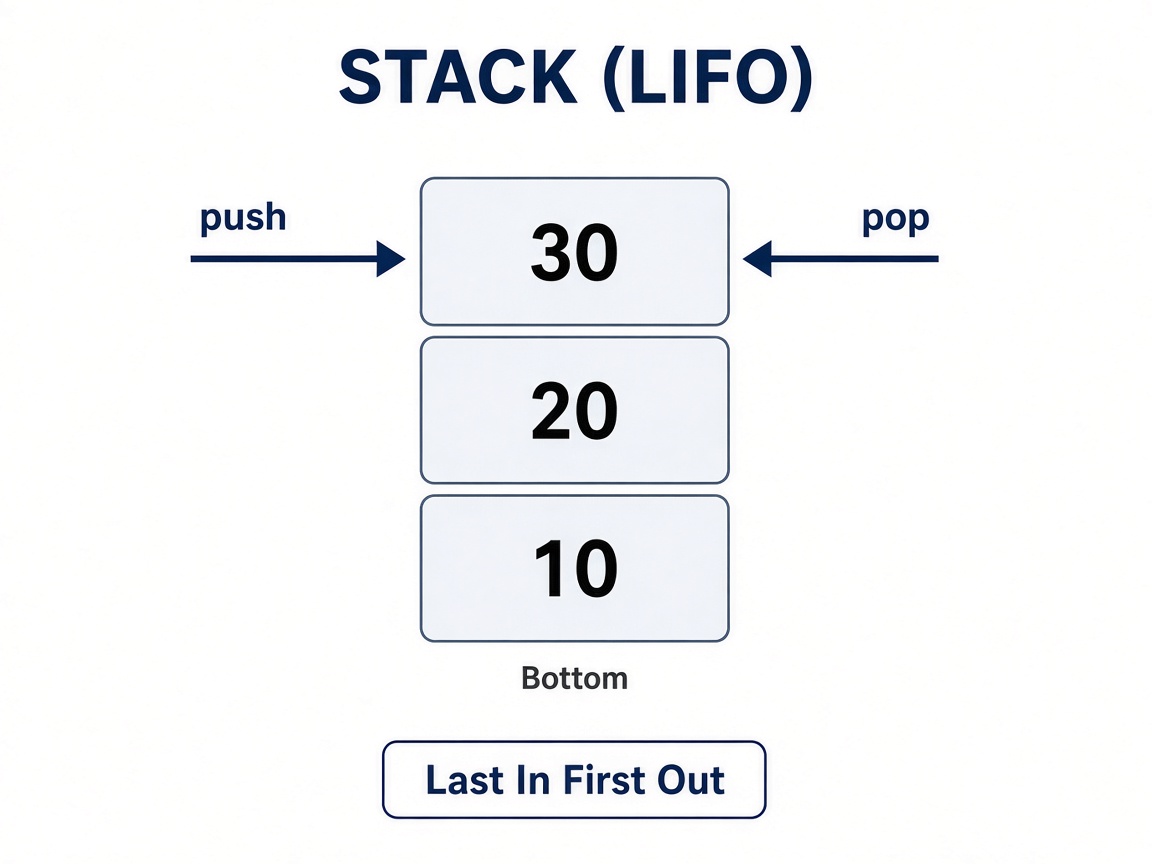
A stack is a LIFO (last in, first out) structure with push and pop at one end; a queue is FIFO (first in, first out) with enqueue at the rear and dequeue at the front. In Python a list works as a stack, collections.deque as an efficient queue, queue.Queue for thread-safe queues and heapq for priority queues.
In short: Stack = pile of plates (take the top one). Queue = line at a ticket counter (first come, first served).
Think about it
Stacks and queues are core data-structure questions and the basis for many algorithms. Browser back button (stack), print jobs (queue), task schedulers (priority queue).
list.
append() and list.
pop() are O(1) at the end, so a list is a good stack.
list.
pop(0) is O(n) because every element shifts, so use collections.
deque with append() and popleft(), both O(1).
queue.
Queue provides put(), get(), qsize() and blocking behaviour for producer-consumer threads; queue.
LifoQueue and PriorityQueue also exist.
heapq keeps the smallest item first (min-heap); push tuples (priority, item).
Classic stack applications: balanced parentheses, undo, expression evaluation, DFS and recursion.
Queue applications: BFS, task scheduling and buffering.
Always check emptiness before pop to avoid IndexError.
Key points
- LIFO / FIFO: Last-in-first-out / first-in-first-out.
- deque: Double-ended queue with
O(1)operations at both ends. - Priority queue: Queue that serves the smallest (highest priority) first.
Example
Codefrom collections import deque
from queue import Queue
import heapq
stack = []
stack.append(1); stack.append(2); stack.append(3) # push
print(stack.pop(), stack.pop(), stack) # 3 2 [1]
class Stack:
def __init__(self):
self._data = []
def push(self, x):
self._data.append(x)
def pop(self):
if not self._data:
raise IndexError("pop from empty stack")
return self._data.pop()
def peek(self):
return self._data[-1]
def is_empty(self):
return not self._data
def __len__(self):
return len(self._data)
def balanced(s):
pairs = {")": "(", "]": "[", "}": "{"}
st = Stack()
for ch in s:
if ch in "([{":
st.push(ch)
elif ch in pairs:
if st.is_empty() or st.pop() != pairs[ch]:
return False
return st.is_empty()
print(balanced("{[()]}"), balanced("{[(])}")) # True False
q = deque()
q.append("a"); q.append("b"); q.append("c") # enqueue
print(q.popleft(), q.popleft(), list(q)) # a b ['c']
tq = Queue() # thread-safe
tq.put(10); tq.put(20)
print(tq.get(), tq.qsize()) # 10 1
heap = []
heapq.heappush(heap, (2, "write code"))
heapq.heappush(heap, (1, "plan"))
heapq.heappush(heap, (3, "test"))
print(heapq.heappop(heap)) # (1, 'plan')Command Line Arguments
Command-line arguments are values given after the script name when a program is started, e.g. python app.py Ana --times 3. They are available in sys.argv (a list of strings where argv[0] is the script name), and the argparse module builds full parsers with types, defaults, flags and automatic --help.
In short: Pass inputs to your script from the terminal instead of asking with input().
Think about it
Automation scripts, CLIs and DevOps tools all take command-line parameters. python convert.py input.csv --format json --out result.json
sys.
argv is simple but manual: everything is a string and you validate yourself.
argparse declares positional arguments (required) and optional ones (-n/--times); it converts types (type=int), supports defaults, choices, nargs, boolean flags (action="store_true") and generates usage and error messages.
parse_args() normally reads sys.
argv[1:], but you can pass a list for testing.
Wrap logic in a main() function and guard with if __name__ == "__main__": so the file is importable.
Exit codes: sys.
exit(0) for success and non-zero for failure.
getopt mimics C and is rarely used; third-party libraries such as click and typer build on the same idea.
Key points
- sys.argv: List of command-line strings; index 0 is the script.
- argparse: Standard module for building command-line parsers.
- Positional / optional: Required value / flag with a name.
- Exit code: 0 means success, non-zero indicates error.
Example
Codeimport argparse
import sys
# 1) sys.argv: running python add.py 5 7
fake_argv = ["add.py", "5", "7"] # what sys.argv would hold
print(sum(int(a) for a in fake_argv[1:])) # 12
# 2) argparse
def build_parser():
parser = argparse.ArgumentParser(description="Greet someone")
parser.add_argument("name", help="person to greet") # positional
parser.add_argument("-n", "--times", type=int, default=1, help="repeat count")
parser.add_argument("--shout", action="store_true", help="uppercase output")
return parser
args = build_parser().parse_args(["Ana", "-n", "2", "--shout"])
print(args) # Namespace(name='Ana', times=2, shout=True)
for _ in range(args.times):
msg = f"Hello, {args.name}!"
print(msg.upper() if args.shout else msg)
args = build_parser().parse_args(["Raj"]) # defaults
print(args.times, args.shout) # 1 False
def main(argv=None):
ns = build_parser().parse_args(argv)
print("Hi", ns.name)
return 0
if __name__ == "__main__":
sys.exit(main(["Lin"])) # real script: main() reads sys.argvSolved examples
Write a decorator log_calls that prints the function name and arguments before each call.
Decorator code
Formula Applied:—Approach note: Always return the original result and use wraps.
Write a regex to check that a string is exactly a 6-digit PIN.
Pattern and test
Formula Applied:—Approach note: fullmatch avoids needing ^ and $.
Why use a generator expression instead of a list comprehension for sum(x*x for x in range(10**7))?
Explanation
Formula Applied:—Approach note: Use a list only when you need indexing or several passes.
Write a decorator timer that prints how many seconds a function took. Apply it to a function that sums range(1_000_000).
Decorator sketch
Formula Applied:—Approach note: A decorator returns a new function that wraps the original.
Real-world applications
Using Python Advanced Topics in real projects
Web frameworks use decorators for routes, data pipelines use generators, log parsing uses regex, and automation scripts use argparse.
Common mistakes
❌ Myth: Decorators modify the original function code.
Why this is wrong: They replace the name with a wrapper that calls the original.
✅ Verified Truth: @d above def f means f = d(f).
⚠️ Exam Tip: Show the equivalent assignment form.
❌ Myth: A generator can be iterated many times.
Why this is wrong: It is exhausted after one pass.
✅ Verified Truth: Create a new generator or use a list.
⚠️ Exam Tip: Second list(gen) returns an empty list.
❌ Myth: assert is good for validating user input.
Why this is wrong: python -O removes assertions.
✅ Verified Truth: Use raise ValueError/TypeError for validation.
⚠️ Exam Tip: assert is for developer sanity checks.
Revision notes
Advanced Python features make code shorter, faster and more expressive: decorators, generators, itertools, regular expressions, date and time handling, assertions, magic methods, stack and queue structures and command-line programs.
High-Yield Quick Revision Points
- Decorator: f = deco(f); use functools.wraps; factory for arguments.
- Generators yield lazily, single-use, O(1) memory.
- itertools: product, permutations, combinations, groupby (sort first), accumulate.
- Regex: raw strings; match vs search vs fullmatch; greedy vs lazy.
- datetime: timedelta arithmetic, strftime/strptime.
- assert for debugging only; raise for validation.
- Dunder methods customise operators and built-ins; sys.argv/argparse for CLI.
Practice questions
The statement @deco above def f is equivalent to
Which keyword turns a function into a generator?
len(list(combinations(range(5), 2))) equals
Which re function matches only at the beginning of the string?
Which magic method makes an instance callable?
Best structure for an O(1) FIFO queue in Python is