Chapter 06
Python Lists
4 topics · 1 sections · beginner-friendly study notes · Updated
A list is an ordered, mutable collection that can hold items of any type.
This chapter covers creating and slicing lists, the built-in list methods, list comprehensions and how a list differs from a tuple.
Lists are the most-used data structure in Python; nearly every program, lab question and interview round uses them.
Storing marks, shopping carts, rows read from a file, results from an API, queues and stacks.
Python Lists
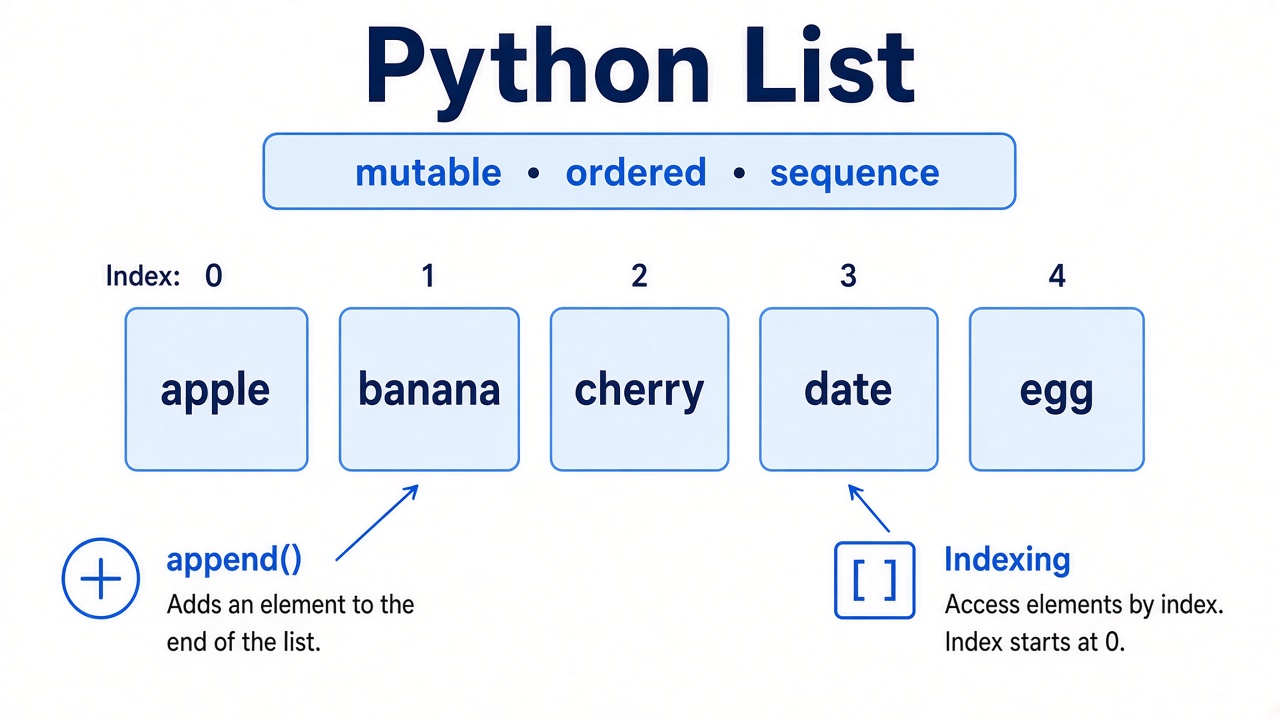
A list is an ordered, mutable sequence written inside square brackets, e.g. [10, 20, 30]. Items keep their insertion order, can be duplicated, can be of different types, and can be changed after the list is created.
In short: A list is a row of boxes numbered from 0. You can put anything in a box, swap what is inside, and add or remove boxes.
Think about it
Programs need to keep many related values together and change them as the program runs. A list gives ordered, changeable storage. A playlist: songs stay in order, you can add, delete or reorder them.
Each item has an index: the first item is index 0 and the last is index -1.
Slicing lst[start:stop:step] returns a NEW list; stop is excluded.
Lists store references to objects, so b = a does not copy the list, it makes two names for the same list.
Use `a.
copy(), a[:] or list(a)` for a shallow copy (inner lists are still shared).
Out-of-range index access raises IndexError but slicing never raises.
len(), in, + (concatenate) and * (repeat) work on lists.
Be careful with [[0]*3]*2 because both rows are the same object; use a comprehension instead.
Key points
- Index: Position of an item, starting at 0 (negative counts from the end).
- Slice: A sub-list produced by lst[start:stop:step].
- Mutable: Can be changed in place after creation.
- Shallow copy: New outer list, but inner objects are shared.
- Lists are heterogeneous:
[1, "two", 3.0, [4, 5]]is valid. - Empty list:
[]orlist().
Read more
Example
CodeCreating, indexing, slicing and copying lists: nums = [10, 20, 30, 40, 50] print(nums[0], nums[-1]) # 10 50 print(nums[1:4]) # [20, 30, 40] print(nums[::-1]) # [50, 40, 30, 20, 10] nums[0] = 99 # lists are mutable print(nums) # [99, 20, 30, 40, 50] print(len(nums), 30 in nums) # 5 True mixed = [1, "two", 3.0, [4, 5]] print(mixed[3][1]) # 5 a = [1, 2, 3] b = a # same list, two names b.append(4) print(a) # [1, 2, 3, 4] c = a.copy() # independent shallow copy c.append(5) print(a, c) # [1, 2, 3, 4] [1, 2, 3, 4, 5] grid = [[0] * 3 for _ in range(2)] # correct 2x3 grid print(grid) # [[0, 0, 0], [0, 0, 0]]
Python List Methods
List methods are built-in functions attached to a list object that add, remove, search, count, order or copy its items. Most of them change the list in place and return None.
In short: These are the buttons on a list: append to add at the end, pop to take out, sort to arrange, and so on.
Think about it
Knowing the methods avoids writing manual loops and is directly tested in output-prediction questions. A to-do app: add task (append), finish task (remove), sort by priority (sort).
Adding: append(x) adds one item at the end, insert(i, x) adds at position i, `extend(iterable)` adds every element of another iterable.
Removing: remove(x) deletes the first match (ValueError if absent), pop(i) removes and returns the item at i (default last), clear() empties the list; del lst[i] also works.
Searching: index(x) returns first position, count(x) counts occurrences.
Ordering: sort() sorts in place (use key= and reverse=True), reverse() reverses in place, while the built-in sorted(lst) returns a new list.
A common bug is `lst = lst.
sort()` which stores None.
append adds the whole object (even a list) as ONE item whereas extend adds its elements.
pop(0) and insert(0, x) are O(n); append and pop() are O(1).
Key points
- In place: The original list is modified; nothing new is returned.
- append vs extend: append adds one object; extend adds each element of an iterable.
- key function: Function applied to each item to decide sort order.
Read more
Example
CodeCommon list methods:
fruits = ["apple", "banana"]
fruits.append("cherry")
fruits.insert(1, "kiwi")
fruits.extend(["fig", "grape"])
print(fruits) # ['apple', 'kiwi', 'banana', 'cherry', 'fig', 'grape']
fruits.remove("kiwi")
print(fruits.pop()) # grape
print(fruits.pop(0)) # apple
print(fruits) # ['banana', 'cherry', 'fig']
nums = [3, 1, 2, 3]
print(nums.count(3), nums.index(2)) # 2 2
nums.sort() # [1, 2, 3, 3]
nums.sort(reverse=True) # [3, 3, 2, 1]
print(sorted(["bb", "a", "ccc"], key=len)) # ['a', 'bb', 'ccc']
x = [1, 2]
x.append([3, 4])
print(x) # [1, 2, [3, 4]]
y = [1, 2]
y.extend([3, 4])
print(y) # [1, 2, 3, 4]
r = nums.sort()
print(r) # None (sort returns None)
nums.clear()
print(nums) # []append / insert / extend
Add one item at the end, add at an index, or add many items.
remove / pop / clear
Delete by value, delete by index (returns the item), or empty the list.
sort / reverse / sorted
sort and reverse change the list; sorted returns a new list.
count / index
Count occurrences or find the first position of a value.
Python List Comprehension
A list comprehension is a compact expression that builds a new list by applying an expression to each item of an iterable, optionally filtering items with an if condition: `[expr for item in iterable if cond]`.
In short: It is a one-line for-loop that directly produces a list.
Think about it
It is idiomatic Python, shorter than loops, and very common in interviews and real code. From a list of prices, quickly create a list of prices with tax or only the ones above 100.
Equivalent loop: create an empty list, loop, optionally test, append the expression.
Syntax variants: filter (if at the end), conditional value (a if cond else b BEFORE the for), nested loops (read left to right in the same order as nested for statements) and flattening ([n for row in m for n in row]).
The loop variable does not leak outside the comprehension in Python 3.
Comprehensions are usually faster than append in a loop and more readable if kept short.
For huge data, use a generator expression (x for x in data) which produces items lazily.
The same idea gives set comprehensions `{x for ...
} and dict comprehensions {k: v for ...
}`.
Avoid comprehensions with side effects or very long logic.
Key points
- Comprehension: Expression that builds a collection from an iterable.
- Filter condition: The trailing
ifthat keeps only matching items. - Generator expression: Same syntax with parentheses; produces values lazily.
Read more
Example
CodeList comprehension patterns:
squares = [x * x for x in range(1, 6)]
print(squares) # [1, 4, 9, 16, 25]
evens = [x for x in range(10) if x % 2 == 0]
print(evens) # [0, 2, 4, 6, 8]
labels = ["even" if x % 2 == 0 else "odd" for x in range(4)]
print(labels) # ['even', 'odd', 'even', 'odd']
pairs = [(a, b) for a in [1, 2] for b in "xy"]
print(pairs) # [(1, 'x'), (1, 'y'), (2, 'x'), (2, 'y')]
matrix = [[1, 2], [3, 4]]
flat = [n for row in matrix for n in row]
print(flat) # [1, 2, 3, 4]
words = ["hi", "python"]
lengths = {w: len(w) for w in words} # dict comprehension
print(lengths) # {'hi': 2, 'python': 6}
gen = (x * x for x in range(3)) # generator expression
print(sum(gen)) # 5
# same as comprehension, written with a loop
result = []
for x in range(1, 6):
result.append(x * x)Difference between List and Tuple
A list is a mutable ordered sequence written with [], while a tuple is an immutable ordered sequence written with (). Items of a list can be added, removed or changed after creation; items of a tuple cannot.
In short: List = a notebook you can erase and rewrite. Tuple = a printed sheet that cannot be edited.
Think about it
It is one of the most frequently asked Python interview questions. A student mark list can change; a date of birth (day, month, year) should not.
Mutability: lists support append, remove, sort and item assignment; tuples raise TypeError on item assignment.
Syntax
a one-item tuple needs a trailing comma, `(5,)`
`(5)` is just an int.
Speed and memory: tuples are slightly smaller and faster to create and iterate.
Hashing: tuples containing only hashable items are hashable and can be dictionary keys or set members; lists cannot.
Methods: lists have about 11 methods, tuples only count and index.
Use cases: lists for collections that change (a cart); tuples for fixed records (coordinates, RGB, a function returning several values).
A tuple that contains a list is itself immutable, but the inner list can still change.
Key points
- Immutable: Cannot be changed after creation.
- Hashable: Has a fixed hash value; required for dict keys and set items.
- Trailing comma: Comma that makes (5,) a tuple instead of an int.
Read more
Example
CodeList vs tuple in action:
import sys
lst = [1, 2, 3]
tup = (1, 2, 3)
lst[0] = 9 # works
print(lst) # [9, 2, 3]
try:
tup[0] = 9 # fails
except TypeError as e:
print(e) # 'tuple' object does not support item assignment
print(type((5)), type((5,))) # <class 'int'> <class 'tuple'>
point = {(1, 2): "A"} # tuple as a dict key
# bad = {[1, 2]: "A"} # TypeError: unhashable type: 'list'
print(sys.getsizeof(lst) > sys.getsizeof(tup)) # usually True
t = (1, [2, 3])
t[1].append(4) # inner list is still mutable
print(t) # (1, [2, 3, 4])Solved examples
Find the output: a = [1, 2, 3]; b = a; b.append(4); print(a)
Printed list
Formula Applied:—Approach note: Use a.copy() when you need an independent list.
Given marks = [45, 78, 90, 32, 66], print the marks above 50 in descending order.
Sorted filtered list
Formula Applied:—Approach note: sorted returns a new list; marks stays unchanged.
Flatten [[1, 2], [3], [4, 5]] into a single list.
Flat list
Formula Applied:—Approach note: Write the for clauses in the same order as nested loops.
Start with nums = [10, 20, 30]. Append 40, insert 15 at index 1, then remove 20. Show the final list.
Final list
Formula Applied:—Approach note: remove deletes by value; pop deletes by index.
Real-world applications
Using Python Lists in real projects
Storing marks, shopping carts, rows read from a file, results from an API, queues and stacks.
Common mistakes
❌ Myth: b = a creates a copy of the list.
Why this is wrong: Assignment only copies the reference.
✅ Verified Truth: Both names point to the same list. Use copy() or a slice.
⚠️ Exam Tip: Output questions on aliasing are very common.
❌ Myth: nums = nums.sort() sorts and keeps the list.
Why this is wrong: sort() returns None.
✅ Verified Truth: Call nums.sort() alone, or use sorted(nums).
⚠️ Exam Tip: Remember: in-place methods return None.
❌ Myth: (5) is a tuple with one item.
Why this is wrong: Parentheses alone do not make a tuple.
✅ Verified Truth: The comma does: (5,).
⚠️ Exam Tip: type((5)) is int.
Revision notes
A list is an ordered, mutable collection that can hold items of any type. This chapter covers creating and slicing lists, the built-in list methods, list comprehensions and how a list differs from a tuple.
High-Yield Quick Revision Points
- List: ordered, mutable, allows duplicates, [ ]
- Slicing returns a new list and excludes stop
- append adds one object; extend adds elements
- sort/reverse/append/remove return None
- Comprehension: [expr for x in it if cond]
- Tuple: immutable, hashable, (5,) needs a comma
Practice questions
What is the index of the last item of a list?
What does [1, 2].extend([3, 4]) produce?
What does print([1, 2, 3].pop(0)) print?
Output of [x for x in range(5) if x % 2]?
Which of these can be a dictionary key?
What does lst.sort() return?